
Support
Support
Intro to eBooks
The term eBook refers to an electronic version of a printed book. eBooks can be read on a variety of devices in addition to eReader software on devices such as mobile phones and personal computers. The most important consideration when purchasing an eBook is what device you intend to purchase the eBook for.
Online eBook: Our Online eBook option allows you to access your content anywhere, anytime, and on all of your favorite devices, with no software to download! Our browser-based eReader means that you can access your eBook on any Internet-enabled device by simply clicking "Read now" from your My eLibrary. Once you have access to the eBook, you may choose to read it offline for ten days at a time.
See the Online eBook section on the FAQ tab for additional information.
PDF eBook: PDF eBooks are essentially electronic versions of the printed volume and thus include page numbering. PDF eBooks have a static layout with set page breaks. Although PDF eBooks do not automatically adjust to fit your screen, you can zoom in on a page or graphic. This format is best viewed on your computer or device with a larger screen. PDF eBooks are readable on your computer, Android device and iPad using Adobe Digital Editions (download for free). Before downloading the eBook, you must authorize your device with an Adobe ID. Once you have downloaded the file onto your device, the PDF eBook can be read offline on that device.
See the PDF eBook section on the FAQ tab for additional information.
The eBook PDF format may be read on several eReader devices (Sony Reader or B&N Nook, for example). The Amazon Kindle uses the MobiPocket file format, which is not compatible with eBook PDF. Record Research eBooks are not offered in this format because the MobiPocket file format is not supported by Adobe Digital Rights Management, which prevents users from sharing files electronically.
eReader devices are hardware devices that function primarily to display eBooks. Additional information can be found in the FAQ section.
eReader software is a program that allows the consumer to read eBooks on different types of hardware devices, such as personal computers or mobile phones. Additional information can be found in the FAQ section.
Frequently Asked Questions
General
To give a Record Research eBook as a gift, you will need to create a new account by clicking on "Login" on the top right of the screen.
IMPORTANT: If you already have an account under which you have purchased Record Research eBooks, you will still need to create a new account that you will transfer to the recipient of your gift.
Under "Login," you will see the option to "Create a new account." Choose a username and password that you can share with your eBook's recipient. If you already have a Record Research account, you will need to enter an email address that is not tied to your account.
Purchase the eBook(s) that you would like to give. When you are ready to "deliver" your eBook gift, share the following information with your gift's recipient:
-
this site's url, http://recordresearch.directfrompublisher.com/
-
account username
-
account password
Once your recipient logs into the account, they can change the account's username, password and email address.
IMPORTANT: The first user to download the eBook will be the only one to access the eBook as the eBook's DRM certificate will be tied to their Adobe Digital Editons (ADE) account. Do not download the eBook to your computer or other device if you intend to give the eBook as a gift. If you do so, then, when your gift recipient logs into their account, they will be blocked from downloading their eBook.
Your recipient will need to have installed the following free applications to read their eBook on their:
- computer, need Adobe Digital Editions,
- iPad, iPhone or iPod Touch, need Bluefire,
- Android device, need Aldiko,
- other devices, see the Softward and Hardware Guides on our Support page.
IMPORTANT: Record Research eBooks cannot be read by Kindle devices.
After your recipient logs into their account, they will need to:
- Click on "My account" at the top right of their screen.
-
Click on "My eLibrary" and they will see the dowload for the eBook you purchased listed there.
-
Finally, click on Download.
No. Please confirm all purchases before you complete them as all sales are final. There are no refunds for digital content.
A charge will immediately appear on your credit card statement under the name "Sheridan Books".
Please e-mail web@recordresearch.com for all technical-related questions. A representative will respond to your question within 48 hours.
New titles are added to our eBook program on a regular basis. If you don't see the title you're looking for now, it may be available soon, so stay tuned. Keep informed by signing up as a Record Research email subscriber here. You can also email us with your requests.
After logging in, click on My Account. Click on the edit tab (upper right, under My Account). Type your new password into the "password" and "confirm password" fields and save.
Go to www.recordresearch.com where you’ll find the vast catalog of Joel Whitburn’s Record Research books. You’ll get the facts and stats on every artist and recording that made the Pop, Country, R&B, Rock and Adult Contemporary singles and albums charts.
Click on the "Login" link on the top right of the eBookstore home page to get to the login screen. Type your credentials into the username and password fields and click the "Login" button to access your account.
No. You must create another account to purchase eBooks. The purchase histories of both accounts will not be linked. You may use the same username and password for both accounts, for ease of memory.
Online eBook format
Our online reader allows you to access your materials on any Internet-enabled device including tablets, smartphones, desktops, and laptops. Offline access is available, but no downloads are required!
Our online reader provides a consistent design and experience across all browsers and devices, allowing you to focus on your eBook instead of learning the platform or downloading software.
- Fast, easy navigation
- Linked Table of Contents and bookmarking
- In-text and marginal note taking
- Highlighting of text, graphs, and images
- Keyword search within text and notes
- Note and bookmark organizer
- Pen tool
- Built-in dictionary
- Offline access to most titles
- Printing options on most titles
- Flashcard creation
- Personalized study guide
- Collaboration and note sharing
Click and hold down the left mouse button, then drag the pointer over the word(s) you would like to highlight or annotate. To delete a highlight or note, click on the annotation you would like to delete and select the trash can icon.

Step 1: Select the pen icon located in the upper right-hand side of the tool bar, and select which tool you would like to use to make an annotation.

Step 2: Select the color of your text, note, or highlight.

Step 3: Click anywhere on your eBook to insert your annotation.
To delete or edit an annotation, select the annotation in the margin. This will allow you to move, edit, or delete an annotation.
YES, our eReader offers an offline function where users can select a page range to cache within their browser for when wifi is not available. The percentage of offline availability is determined by the publisher. This is not a downloadable eBook. To determine if your eBook will allow for offline access, select the settings icon when viewing the book.
Note: You must have an Internet connection to activate Offline mode. Clearing your browser cache may disrupt the Offline functionality. For the best results, please use Chrome.
Step 1: Log in and navigate to your My eLibrary to select the eBook you would like to view in Offline mode. Select ‘Read Now’ to open your eBook.
Step 2: Select ‘Offline’ from the main menu.
Step 3: Select the content you want to access offline.
Step 4: Select Download Now.
Step 5: Copy and paste the link into a new tab or refresh the page to enable offline mode.
Step 6: Bookmark the page to be used at a later date offline. Note: the offiline pages are only available for 10 days at a time.
Yes, our online reader offers a printing function where users can select a page range to print. The percentage of the eBook that is available to print is 20%.
Step 1: Log in and select the eBook you would like to print from your My eLibrary. Select ‘Read now’.
Step 2: Once inside your eBook, in the upper right-hand corner select the ‘printer’ icon.

Step 3: Select ‘Create a New Print Job’.

Step 4: Select an individual page number and click ‘Add Page’, or select a range of pages and click ‘Add Range’.

Step 5: The page(s) you are requesting to print will appear within the grey box. Select ‘Create Document’ to proceed with printing.
Please note: If you are printing more than 25 pages it may take up to 15 minutes to become available. Select the ‘Email Me When My Document is Ready’ to be notified when it’s finished.
Option 1: To create a flashcard from text within the eBook, click and hold down the left mouse button, then drag the pointer over the word(s) and select the ‘flashcard’ icon in the tool box that appears.

Option 2: To create a flashcard from the definition of a word, highlight the word and select the ‘Define’ icon (looks like a pair of glasses). Click the rectangular Flashcard icon next to the definition to create the flashcard. Create a new flashcard deck, or add the flashcard to an existing deck.


Step 1: Locate your flashcards by selecting the ‘Navigation’ icon (looks like three lines) in the upper left-hand corner of the screen and select ‘Study Flashcards’.
Step 2: Flashcards are automatically organized by chapter and the custom deck names you’ve created. Select ‘Study by Chapter’ or ‘Study by Deck’ to proceed to studying your flashcards.
Step 3: Select ‘All’ or the individual sections you wish to study flashcards for and select the ‘Start Flashcards’ button.
Step 4: As you study flashcards, use the arrow buttons on the side of each large flashcard to jump to the next or previous card. To view the other side, click directly on the flashcard.
Step 1: To enable this feature, select the ‘Navigation’ icon in the upper left-hand corner of the screen and click into ‘Collaboration’.
Step 2: To join a group, enter the unique 8-digit access code for that group and select ‘Join’.
When joining the session, your notes and highlights will be temporarily removed and the group creator’s notes and highlights will appear in your eBook. Select ‘Exit Session’ to view your notes and annotations again. You can return back to the group creator’s annotations at any time, so long as they keep their group enabled!
Step 1: Select the ‘Navigation’ icon in the upper left-hand corner of the screen and select ‘Collaboration’.
Step 2: Select ‘Create a New Group’ and complete the fields.
Step 3: Share the 8-digit code with others to allow them to join your group and share your notes and highlights. Group members can switch back and forth between your shared notes, and their own!
For real-time collaboration you must join a session. Within ‘Groups you Manage’ you can locate the unique access code, join the session for real-time collaboration, remove users, or delete your group.
All of your annotations including highlights, flashcards, and notes will automatically be added to your study guide.
Step 1: Select the ‘Navigation’ icon in the upper left-hand corner of your screen and select ‘Create a Study Guide’.
Step 2: Organize your study guide by section or colors, or ‘Select All’. Then, select ‘Create Study Guide’ to view your automatic study guide.
*Click on any of your notes and select ‘View in Book’ to jump directly to that page!
Please use our Contact Us form for all technical-related questions. A representative will respond to your question within 24 business hours.
No, you can only view your content on one device at a time because this file type is protected.
PDF eBook format
- Record Research DRM-protected ePDF eBooks can be viewed on multiple devices using either Bluefire Reader, Adobe Digital Editions or Aldiko software.
Reader Apps Compatible with iPhone®, iPad®, and iPod®touch
Bluefire Reader App - Is a paid app compatible with iPhone®, iPad®, and iPod®touch that supports Adobe eBook DRM protected PDF formats.
Adobe Digital Editions - Is a free app compatible with iPhone®, iPad®, and iPod®touch, that supports Adobe eBook DRM protected PDF formats.
Reader Apps Compatible with Android
Adobe Digital Editions - Is a free app compatible with the Android that supports Adobe eBook DRM protected PDF formats.
Computer and Handheld Based Readers
PDF - is readable on computers and handheld devices using Adobe Digital Editions (download for free).
Offline content may also be read using any eReader compatible device, see "What hardware is needed to download my PDF eBook?" in the FAQ section.
Record Research DRM-protected ePDF eBooks can viewed on a PC or Mac using Adobe Digital Editions or Bluefire Reader software.
Record Research DRM-protected ePDF eBooks can viewed on an iPhone®, iPad®, or iPod®touch using Adobe Digital Editions or Bluefire Reader software.
Record Research DRM-protected ePDF eBooks can viewed on an Android device using the free Aldiko App.
Click here for a detailed list of eBook PDF supported devices.
Downloading eBooks purchased from our Bookstore to your PC is easy, and there are only a couple of simple steps to follow. An Adobe ID is required and necessary to ensure that your eBooks are accessible to only you on the devices that you authorize. Reading your eBooks on your PC will be done through the free Adobe Digital Editions software.
|
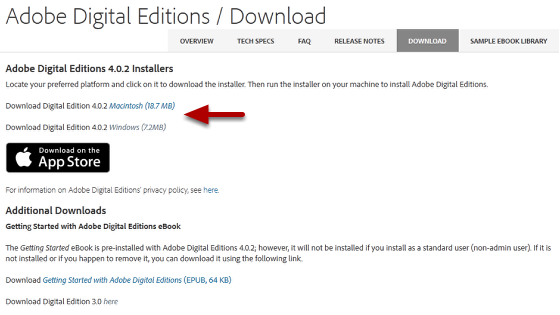
Step 1: Download and install Adobe Digital Editions from the Adobe website. |
 |
|
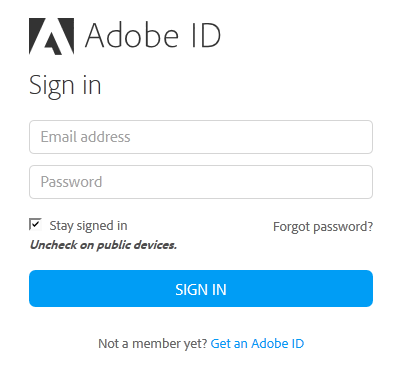
Step 2: If you do not already have one, visit the Adobe website to obtain a free Adobe ID. |
 |
|
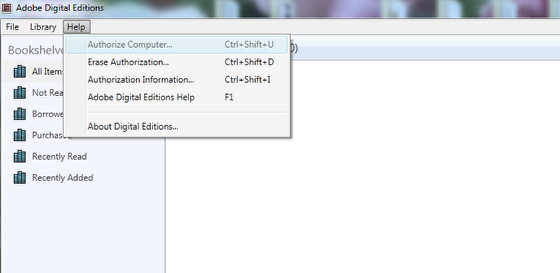
Step 3: After you have installed Adobe Digital Edtions, authorize Adobe Digital Editions from the Help Menu. |
 |
|
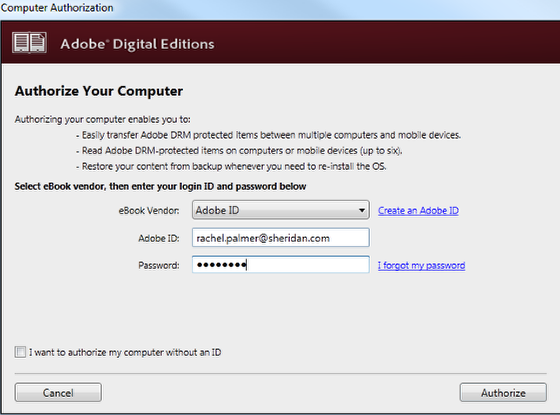
Step 4: Select Adobe ID as the eBook Vendor and enter your Adobe ID and Password. Click Authorize. |
|
|
To download these instructions, click here.
If you are not already, log into the new account you created on this site at the time of your purchase by clicking on 'Login' at the upper right corner of the screen.
Click on "My account" at the top right of the page.
Click on "My eLibrary" and you will see your eBook download listed there.
Click on Download and it will download to your computer, to be opened by Adobe Digital Editions.
eBooks sold by Record Research are copy-protected and must be downloaded and read using Adobe Digital Editions or software that is compatible with Adobe DRM. Adobe® Digital Editions software offers an engaging way to view and manage eBooks and other digital publications. Use it to download and purchase digital content, which can be read both online and offline. You must register your Adobe Digital Editions account in order to read our DRM protected content. To dowload or read more about Adobe Digital Editions click here.
Adobe Digital Editions 2.0 is compatible with a Mac 10.6.8 operating system. Click here to download.
Because of the large size of this eBook file, here are a few options for downloading on to your iPad:
1) Email the file to yourself and open using iBooks or Bluefire. (File size may be an issue for this option too, but it would be the easiest way.)
2) Download to your computer, then load the file to your iPad using iTunes.
3) Load the file using Dropbox. For this option, you would first need a Dropbox account set up and have the Dropbox app downloaded on your iPad. (These are both free). Upload the file to Dropbox on your computer, then open the app on your iPad and once it is downloaded open in iBooks or Bluefire.
This error occurs when you have multiple Adobe accounts and you try to open your eBook from an account other than the one with which you purchased your eBook. To remedy, log into the Adobe account from which you initially purchased your eBook, prior to opening your eBook.
First, open Adobe Digital Editions (ADE) on your old computer and de-authorize it by hitting Ctrl+Shift+D.
Next, install ADE on your new computer and authorize it from the ADE menu.
Yes. Use an eBook Reader compatible with ePDF file formats. Refer to the Hardware and Software guides in the FAQ section.
Yes, you can view your eBook on up to six authorized devices.